
LoDi-Con manual
Club mode
Club mode lets you restrict the LoDi-Con, so that you can hand the device to someone else without worrying that its settings will be changed.
Device settings, locomotive configurations and accessories can all be locked.
It is also possible to lock the LoDi-Con down so that only one locomotive can be driven with it.
Here is how to set club mode up:
Setting a password
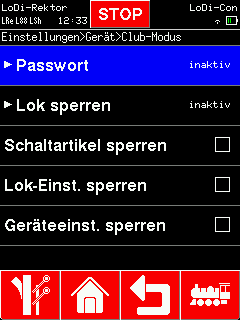
To restrict the LoDi-Con, a password has to be set first. While none is set, the LoDi-Con shows "inactive" next to "Password".
First tap the "house symbol" in the bar at the bottom.
From there go to "Settings" > "Device" > "Club mode".
Under "Password" you can now enter a password.
The password is a four-digit number. You have to enter this "PIN" twice before it is set.

Locking locomotives
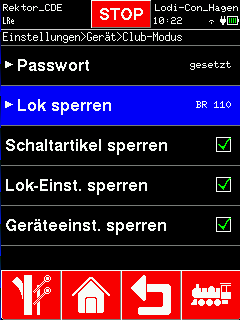
The locomotive menu can now be browsed on the LoDi-Con. Choose which locomotives should stay selectable and drivable.
Locomotives not selected are then no longer shown in the locomotive list.
To lift the lock, choose "Allow all locomotives" in the locomotive selection list

Locking further settings
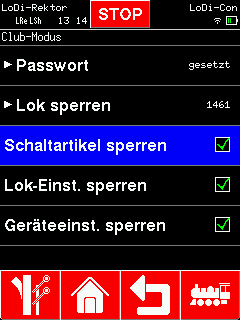
The LoDi-Con can be restricted so far that all that remains is driving one locomotive and switching the device on and off.
To restrict the LoDi-Con further, there is a choice of:
- Lock accessories = every turnout is locked
- Lock loco settings = the locomotive settings cannot be opened or changed
- Lock device settings = every setting of the LoDi-Con, and the firmware update, is locked
Ticking the respective option sets it.
From then on you have to enter the password you set to reach the settings.

Would you like to see the quality of the devices for yourself?
Get in touch with us HERE!
Visit our forum, where experienced users are happy to help you.