
LoDi-Con manual
Stations using the Z21 protocol
Tapping the top left takes you to the overview of command stations, which also shows whether a connection is active. You can now tap the LoDi-S88-Commander (LX) to see its IP address and status.
Some manufacturers on the model railway market use or support the Z21 protocol.
The LoDi-Con, like the LoDi-Rektor, understands the Z21 protocol fully.
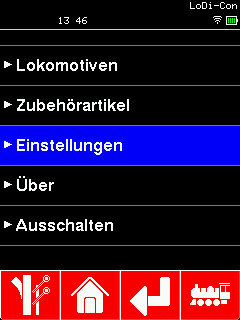
To connect a z21 to the LoDi-Con, proceed as follows:
First tap the "house", which always takes you back to the main screen.
From there go to Settings > Command station >

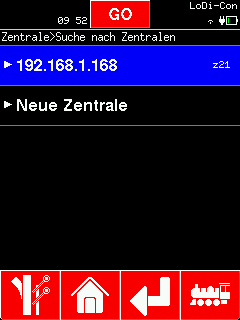
To connect the LoDi-Shift-Commander to the LoDi-Con, proceed as follows:
If command stations are already listed here, you can click "Search for command stations".
Now choose the z21 you want to connect to the LoDi-Con. In our example it is the top one.
(Devices shown green in the "Search for command stations" overview are already known to the LoDi-Con.)

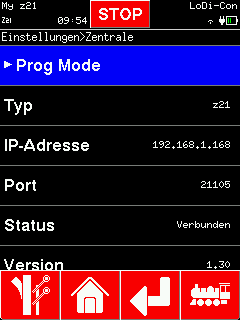
You can change the name of the z21 if you like.
The LoDi-Con now connects to the LoDi-Rektor.
The LoDi-Con now connects to the z21.
A new z21 symbol now has to appear at the top left. If that z21 is steady, the connection is up. If it blinks, the LoDi-Con has no connection to the z21 or is trying to establish one.
Tapping the top left takes you to the overview of command stations, which also shows whether a connection is active. If there are several stations, the z21 can be selected here.

Here you can check whether a connection exists and call up the version number, IP address and UDP port.
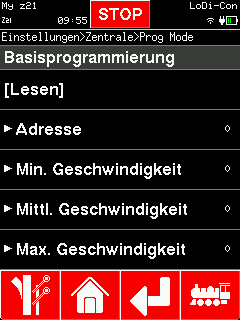
Over the z21 protocol, some command stations — the z21 included — offer a programming track. You reach it by tapping the z21 shown at the top left.
"Prog mode" is shown at the top there.
That takes you straight into CV programming.
Here you can read and write CVs.
We tried to lay the menu out as clearly and simply as possible.

| Command station | DCC 28 | DCC 126 | Accessories, standard | Accessories, extended | Power | Programming track | Note |
|---|---|---|---|---|---|---|---|
| LoDi-Rektor (3.4.8) | ✓ | ✓ | ✓ | ✓ | ✓ | ✓ | |
| Roco z21 (1.43) | ✓ | ✓ | ✓ | ✓ | ✓ | ✓ | 1 |
| Tams mc² (1.7.7) | ✓ | ✓ | ✓ | ✓ | ✓ | ✓ | 2 |
| YaMoRC (8.2.8) | ✓ | ✓ | ✓ | ✓ | ✓ | ✓ | 3,4 |
1 On older firmware versions, enable "Ignore loco info" where necessary
2 An active programming track is not shown
3 The option "Ignore wrong checksum" has to be enabled
4 Speed step feedback is one too low

Would you like to see the quality of the devices for yourself?
Get in touch with us HERE!
Visit our forum, where experienced users are happy to help you.