
LoDi-Con manual
Setting up locomotives and driving
Foreword:
Before you can drive locomotives with the LoDi-Con, a locomotive has to be created.
You can also create and edit locomotives in the LoDi-ProgrammerFX and transfer them to another LoDi-Con. There are also command stations such as the CS2 and CS3 that send their locomotive data to the LoDi-Con.
In our case, though, we assume a standard DCC locomotive that is to be created on the LoDi-Con itself.
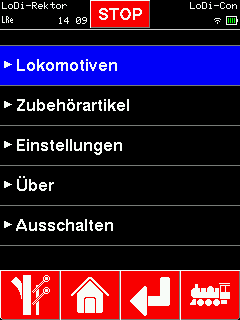
To create a new locomotive, tap the "house".
There you will find a "Locomotives" tab; tap it.
Tapping the locomotive symbol at the bottom right takes you to the same menu.

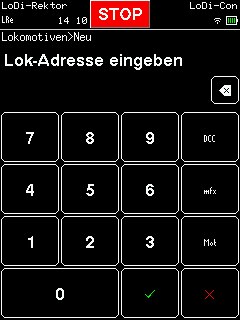
Tapping the "+" at the top right creates a new locomotive. First the locomotive address is entered. You also have to choose the data format to use; in our example we create a locomotive with the DCC address 9500.
Now tap the green tick at the bottom.
The locomotive has now been created with 8 functions including the headlight, and should be drivable straight from the rotary control.
(When choosing the MFX format, the SID of the locomotive is entered first; the LoDi-Con then asks you for the UID as well.)

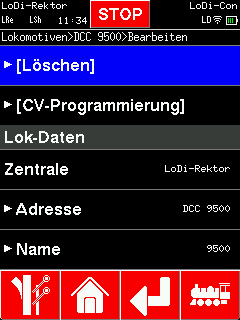

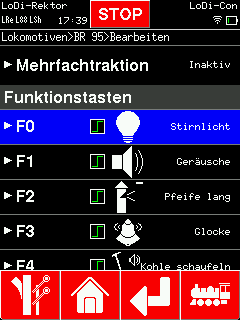
The LoDi-Con can call up to 68 locomotive functions plus the light. All of them can be given pictograms and assigned. To change them, scroll in the locomotive properties down to "Function keys".
Now simply tap a function you want to change and pick the matching icon from the function overview.
We already offer a broad range of locomotive functions, and more will follow.
A locomotive function can be a latching or a momentary function, and switching between the two is easy: tap the function again and the symbol changes to momentary. Tapping it once more sets it back to on/off.

(Missing a locomotive function? Let us know — get in touch here or in the forum)

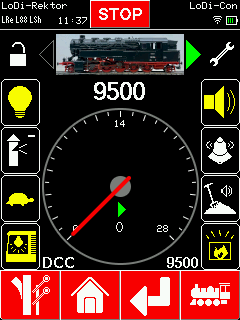
The locomotive is now fully created; you can drive it with the throttle and call its functions from the touch display. If the locomotive has more functions, you reach them by swiping down on the locomotive screen.
Tapping the locomotive symbol at the bottom right takes you back to the locomotive overview.
To make shunting between 2 locomotives easier, the LoDi-Con switches between the last two selected locomotives when you press the locomotive symbol. To get back to the locomotive overview, hold the symbol at the bottom right for longer than 1 second.

Would you like to see the quality of the devices for yourself?
Get in touch with us HERE!
Visit our forum, where experienced users are happy to help you.