
LoDi-Con manual
Showing feedback
Since the LoDi-Con can connect to feedback stations such as the LoDi-S88-Commander (LX), you can have the feedback modules shown on it. That is especially handy when you have to test something on or under the layout and would rather not carry a laptop along.
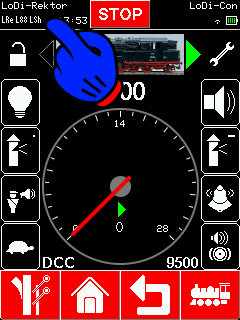
To show the feedback modules, tap the command stations at the top left again.
You are shown the overview of command stations.
Next tap the LoDi-S88-Commander LX.
The connection status is shown there. At the top there is now an entry called "Feedback"; select it.

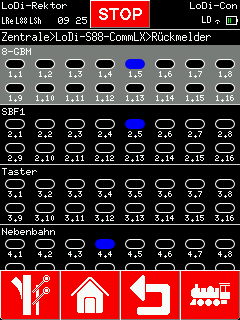
You are now in the feedback overview, where every feedback module is shown. The LoDi-Con reads the data from the LoDi-S88-Commander LX.
Names given to modules are shown as well.

Would you like to see the quality of the devices for yourself?
Get in touch with us HERE!
Visit our forum, where experienced users are happy to help you.