
LoDi-Con manual
CV programming
Why not programme your locomotives comfortably from the LoDi-Con…
In the properties of a locomotive we built in the option of simple or extended CV programming. Here is an example of how it works.
In this example we change CV 3 and CV 4 — the acceleration and braking times.
To programme a CV you need a command station that supports PoM (programming on main) or has a programming track output. In our example we use the LoDi-Rektor to write and the LoDi-S88-Commander LX to read the CVs out on the layout, in a block.
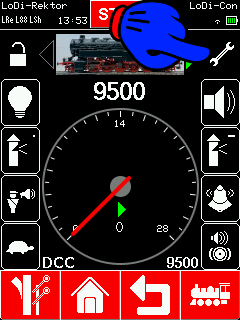
To programme a CV, first go to the locomotive whose CV you want to change.
Tap the "spanner" to reach the settings of the locomotive.
Choose "CV programming".
You go straight into the CV overview. Is the locomotive on the track? Is the power on? Then tapping "Read" should read the CVs of the locomotive out.

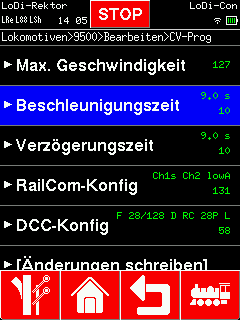
CVs read successfully are shown in green.
Now go to "Acceleration time". Another dialog opens in which you can set the CV.
Repeat this for the "Braking time" (deceleration time).
The changed values are now shown in yellow, so the LoDi-Con shows you which CVs it is going to change.

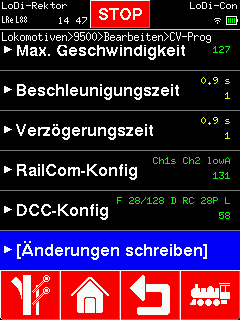
To commit the change to the decoder, go to
"Write changes". The LoDi-Con asks once more whether it should write this data to the locomotive decoder. Confirm with "Yes" and the data is written.
Once written, the CVs are stored and shown in green again.

Other CVs can of course be changed with the LoDi-Con as well. We tried to keep it as clear as possible and followed the DCC standard in doing so.
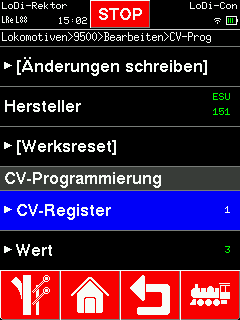
Should a CV not be in our list, you can also reach every CV by hand. Swipe until you come to "CV register".
There you can select the CV register as usual, enter the values and write the changes.

Would you like to see the quality of the devices for yourself?
Get in touch with us HERE!
Visit our forum, where experienced users are happy to help you.