
Hardware
LoDi-84
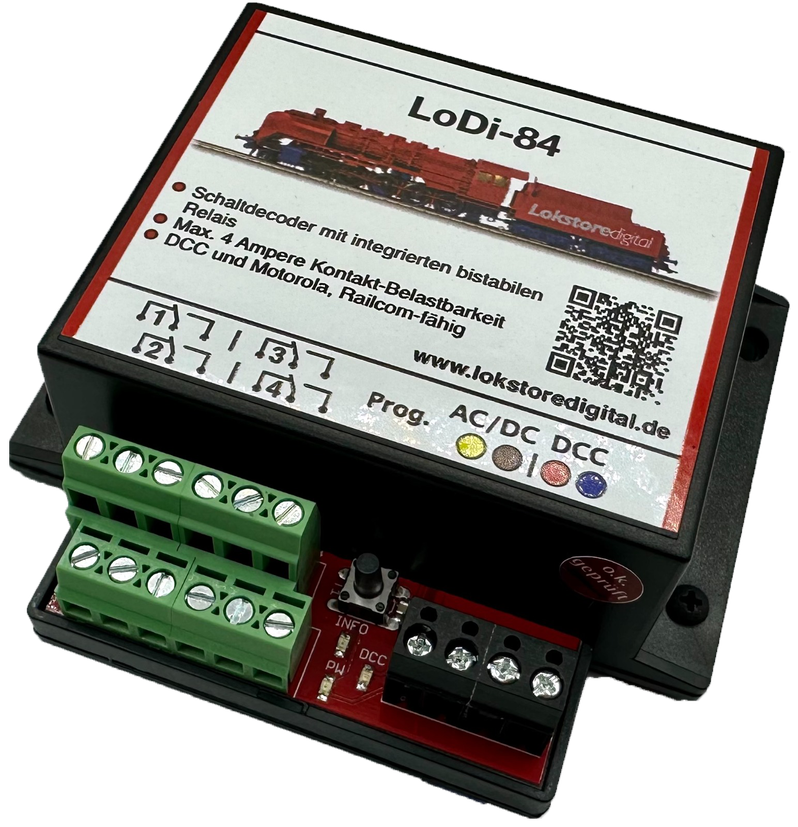
A simple decoder with built-in bistable relays for switching external loads; it is also suitable for cutting power to sections of track such as staging yard roads or dead sections. Thanks to its simple wiring the decoder is ready for use in no time.
Features of the LoDi-84
- An accessory decoder for the DCC and Motorola track protocols.
- Four channels are available, which can be operated alternately, each rated at 4 amperes of contact load.
- Ideal for cutting power to sections of track or staging yard roads.
- The LoDi-84 also suits switching consumers that need AC, such as stop sections, old solenoids or universal motors.
- Easily configured over DCC and RailCom.
1. The LoDi-84 and its connections
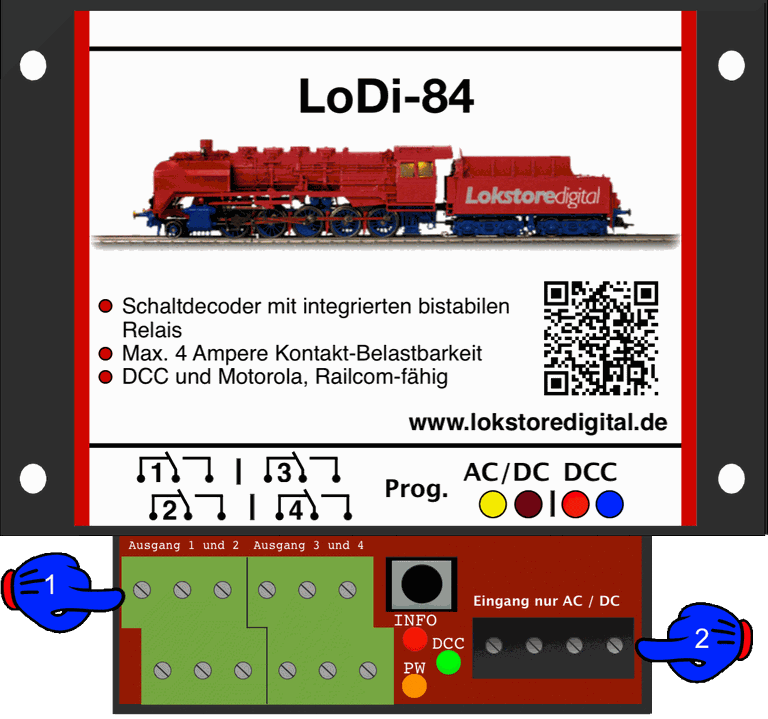
There are several screw terminals on the LoDi-84:
- (1) The loads or track sections to be switched connect here.
- (2) This is the decoder's supply. At the DCC terminal (red, blue) it has to be connected to a digital signal (command station or booster). An external supply connects to the AC/DC terminal.
2. The LoDi-84 LEDs and button
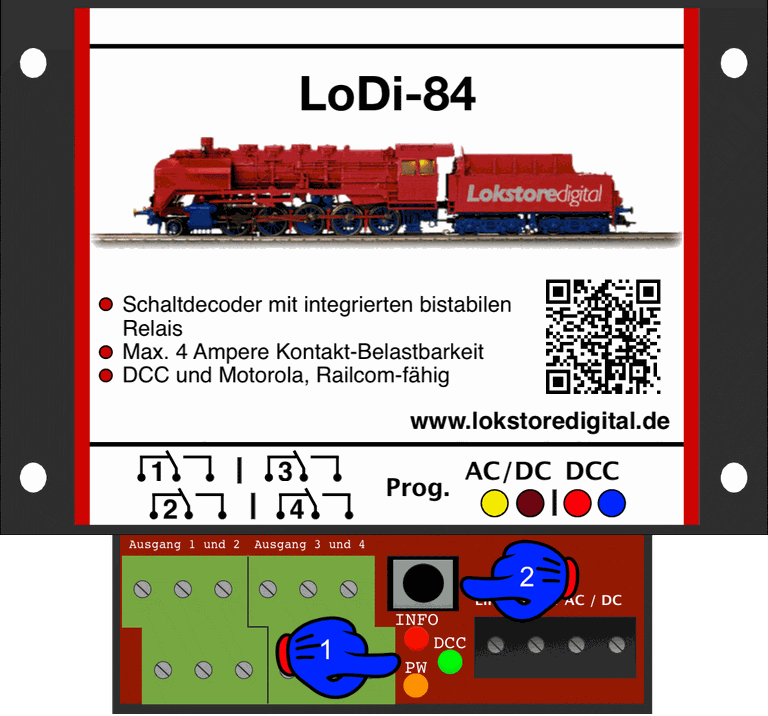
The decoder has three LEDs for status and a button, used to give the decoder an address, for instance.
- (1) The red LED (Info) lights as soon as the decoder receives a signal valid for it, or when RailCom data is sent.
- The green LED (DCC) lights as soon as DCC is present at the decoder.
- The orange LED (PW) lights as soon as the decoder is connected to a transformer. Should there be a short circuit on an output, the orange LED goes out. The LED is also off when the transformer is not connected or is switched off.
3. Connecting a model railway transformer and DCC
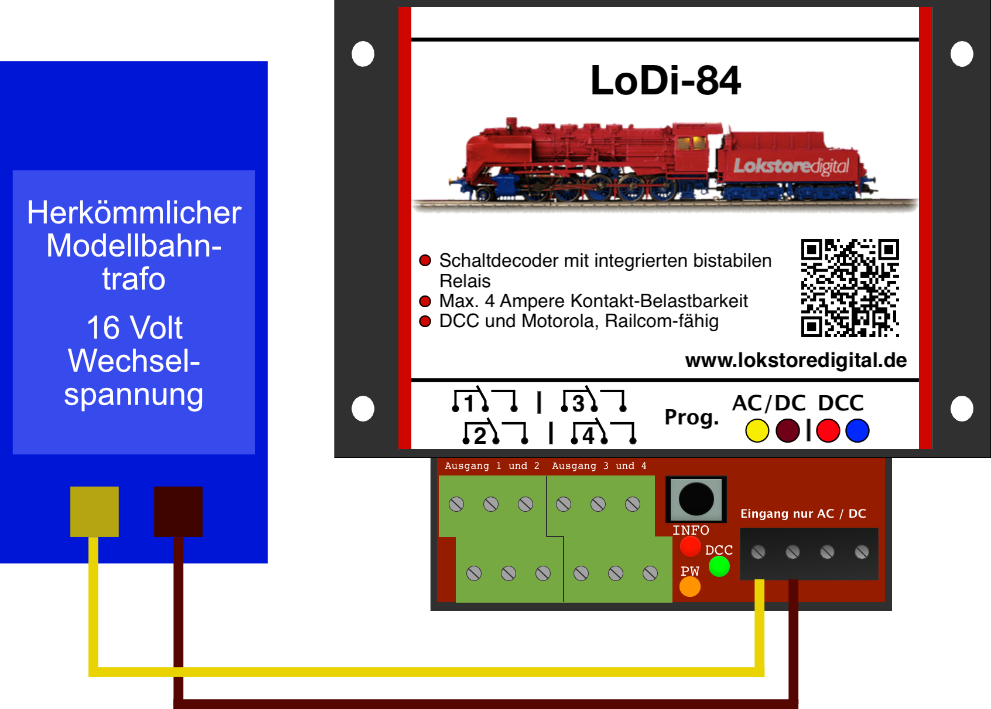
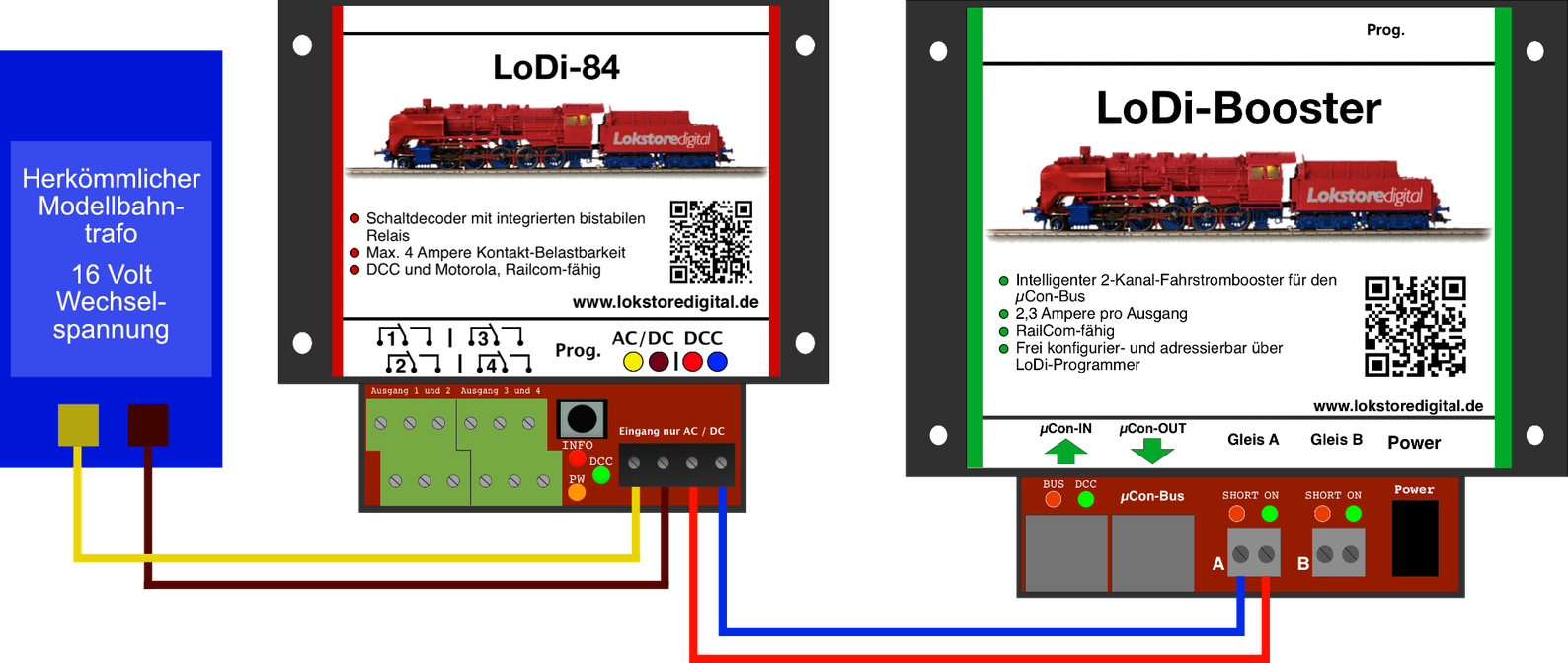
The LoDi-84 has two terminals for feeding in the model railway transformer. If you want to connect several decoders to one transformer, we can recommend the LoDi distribution board series under Accessories.
CAREFUL!
Please do not use cable below 0.75 mm²!
Please watch the polarity of the power supply!
AC ONLY!
Once the decoder is supplied with power, that is E (energy), it has to be able to receive data. For that the decoder should be connected to a command station or a booster.
In the example here we use a LoDi-Booster.
CAREFUL!
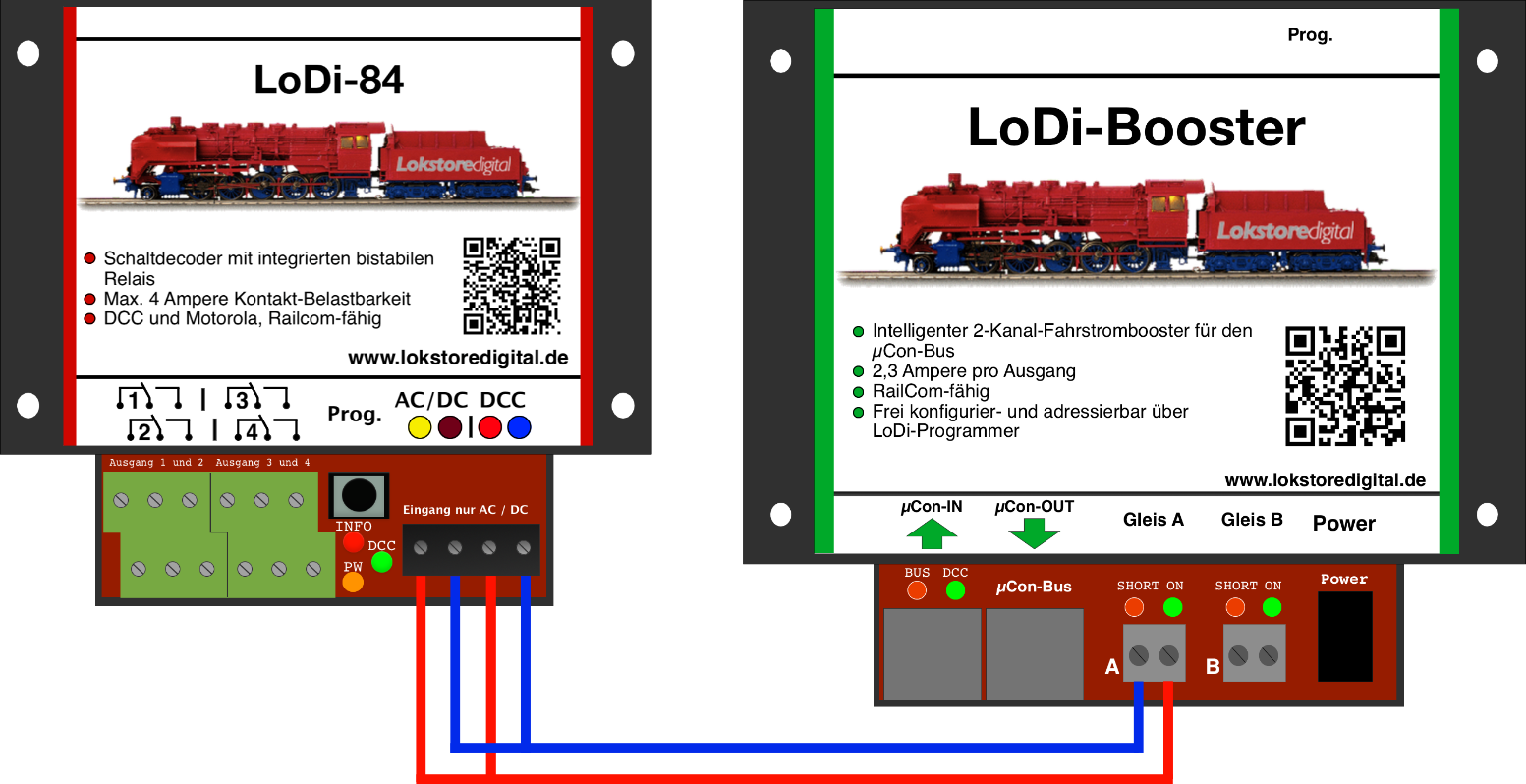
For reliable switching of DCC accessories, a separate circuit or booster output should always be used.
Because the LoDi-84 draws very little current, it only has to supply the internal electronics and switch the relays. It is therefore also possible to power the LoDi-84 without an external supply, directly from the booster voltage.
4. Connecting consumers
External consumers can be switched through the decoder with a bistable relay. Here are a few examples, which we will explain briefly:
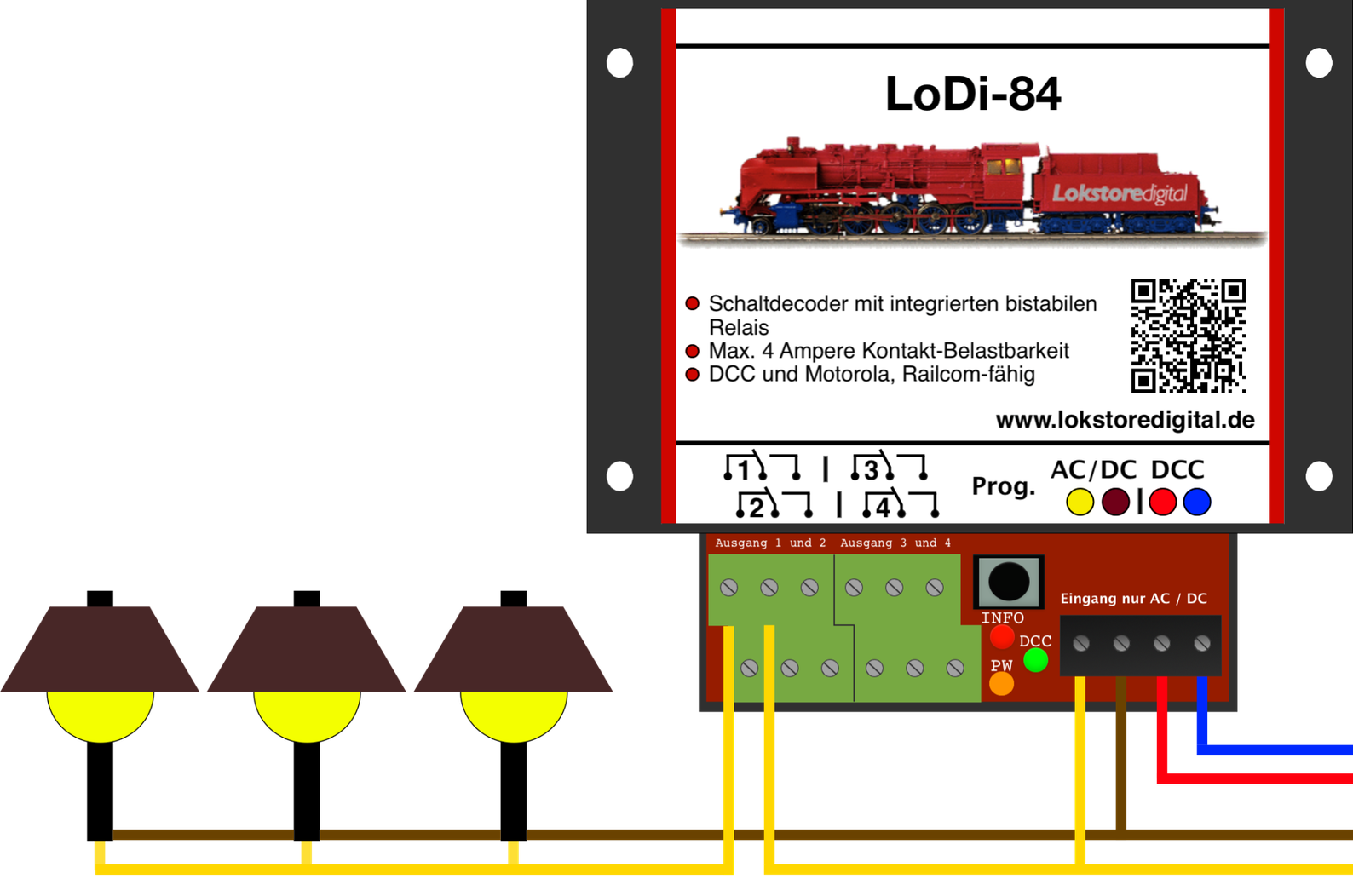
Here is a simple first example: the supply voltage for the load comes from the same model railway transformer as the decoder's. TIP: if you also use this transformer for switching turnouts, it makes sense to use a separate transformer for switching the lighting. Switching a turnout can otherwise make the light flicker briefly.
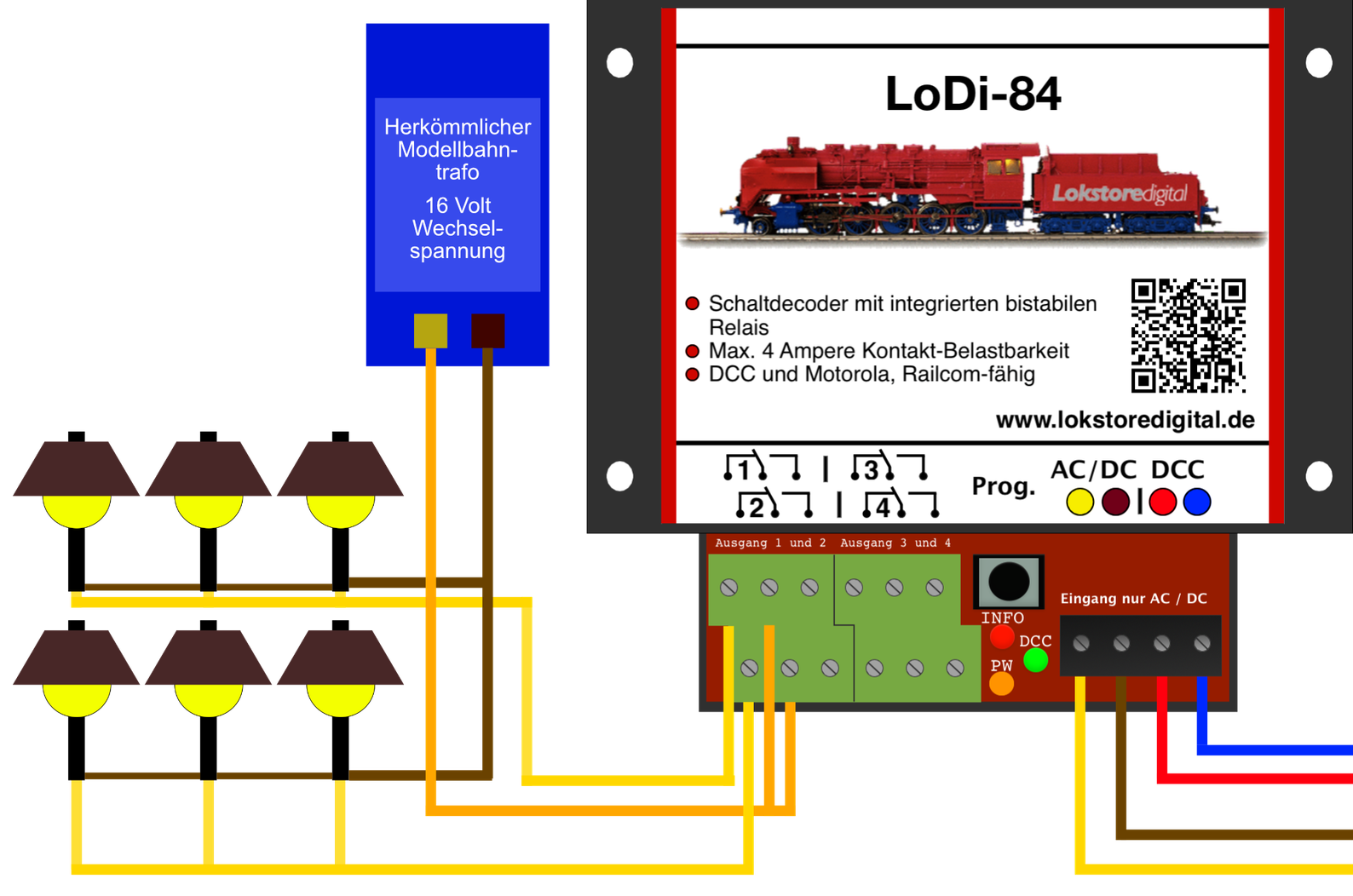
In most cases the decoder is used to switch lamps or street lighting. The source of the supply voltage makes no difference here. Another power supply could equally be used.
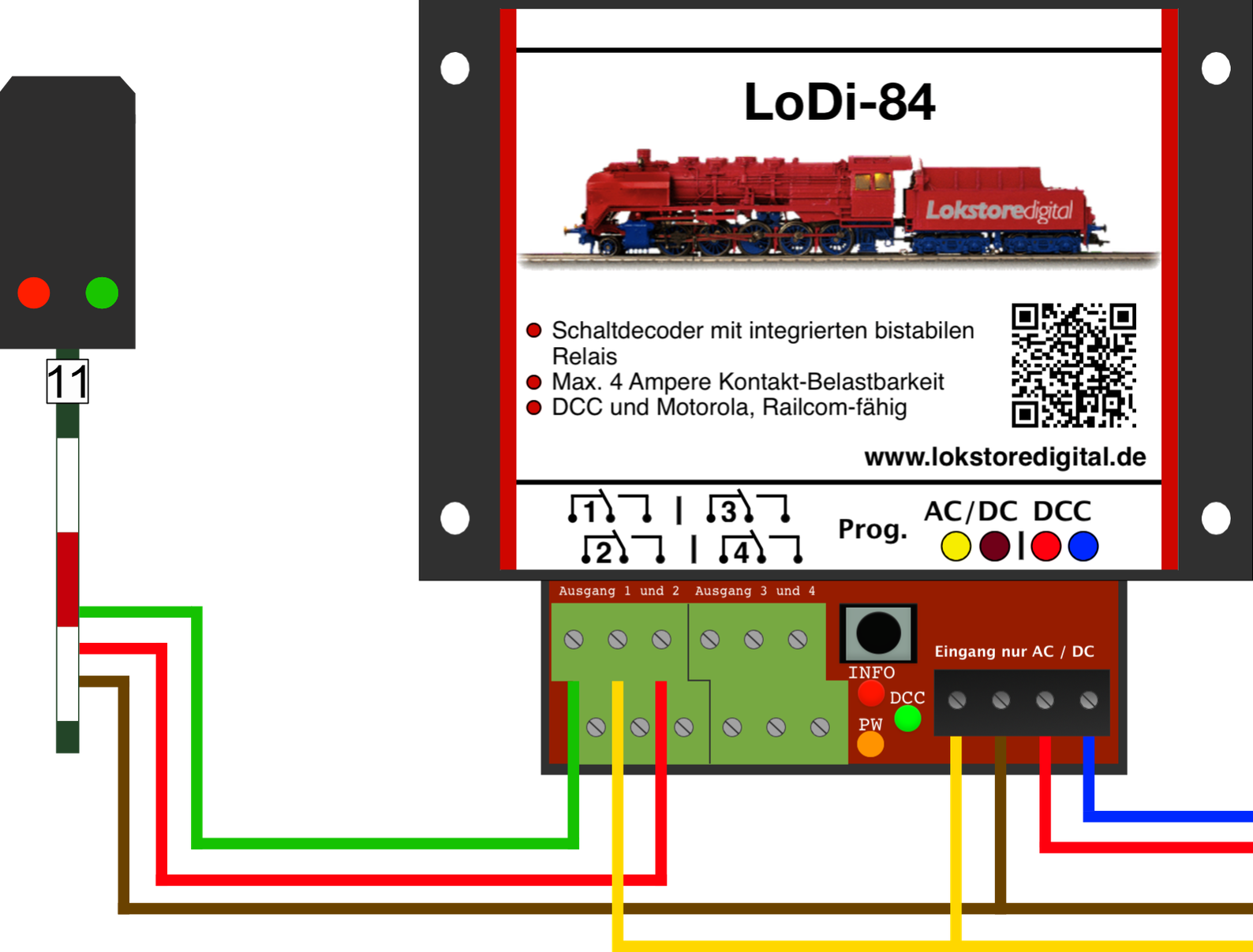
In this example we use a light signal still fitted with bulbs. This signal can be switched excellently through the LoDi-84.
5. Cutting track power with the LoDi-84
With the LoDi-84 you can cut power to individual tracks simply and efficiently. Whether at a signal, before a bridge, or in a staging yard with several roads. This example shows how.
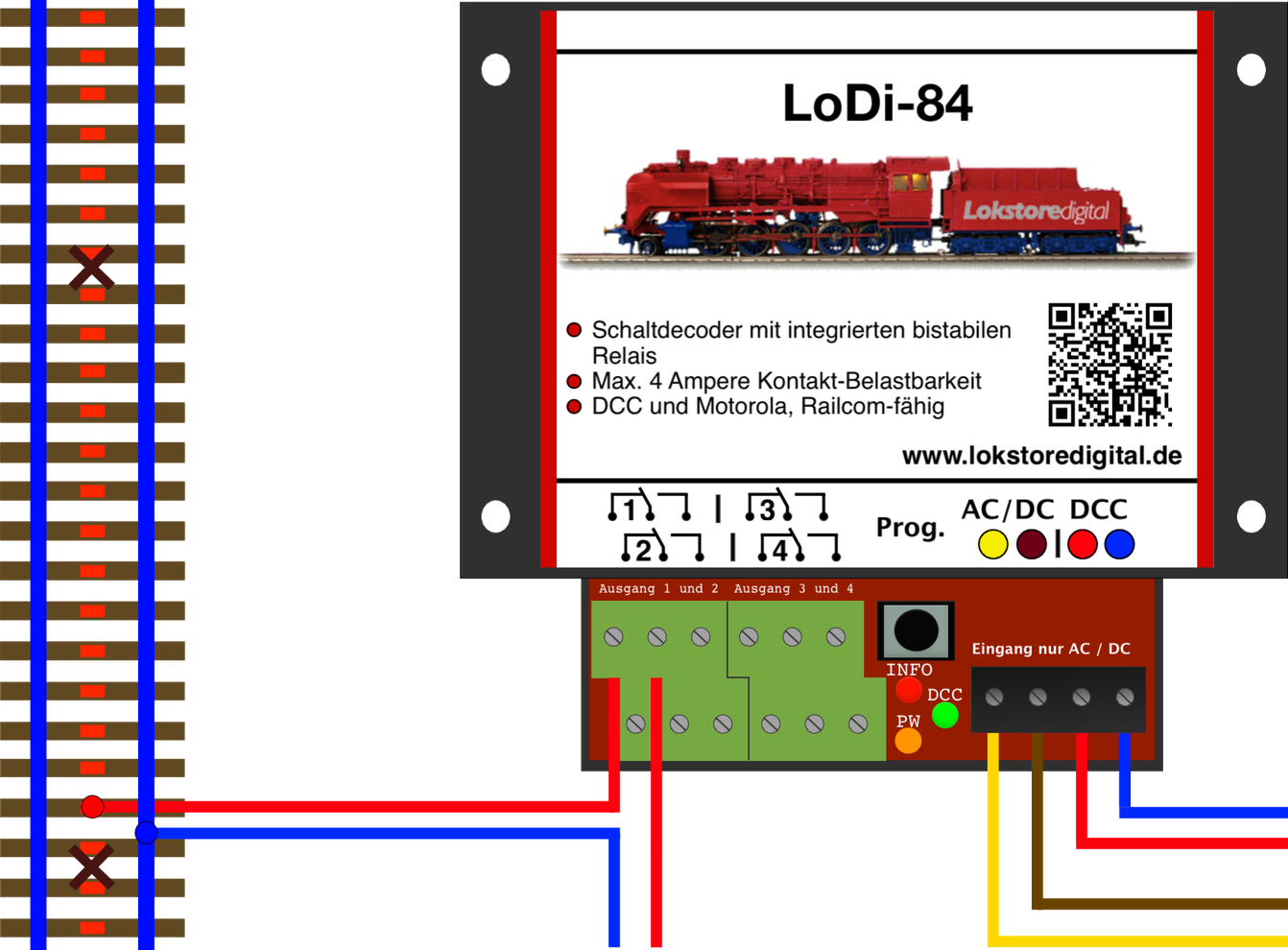
Here we show a simple interruption of the centre rail. The track is now switched off through the LoDi-84. The DCC supply (red and blue track feed wires) comes from a separate booster.
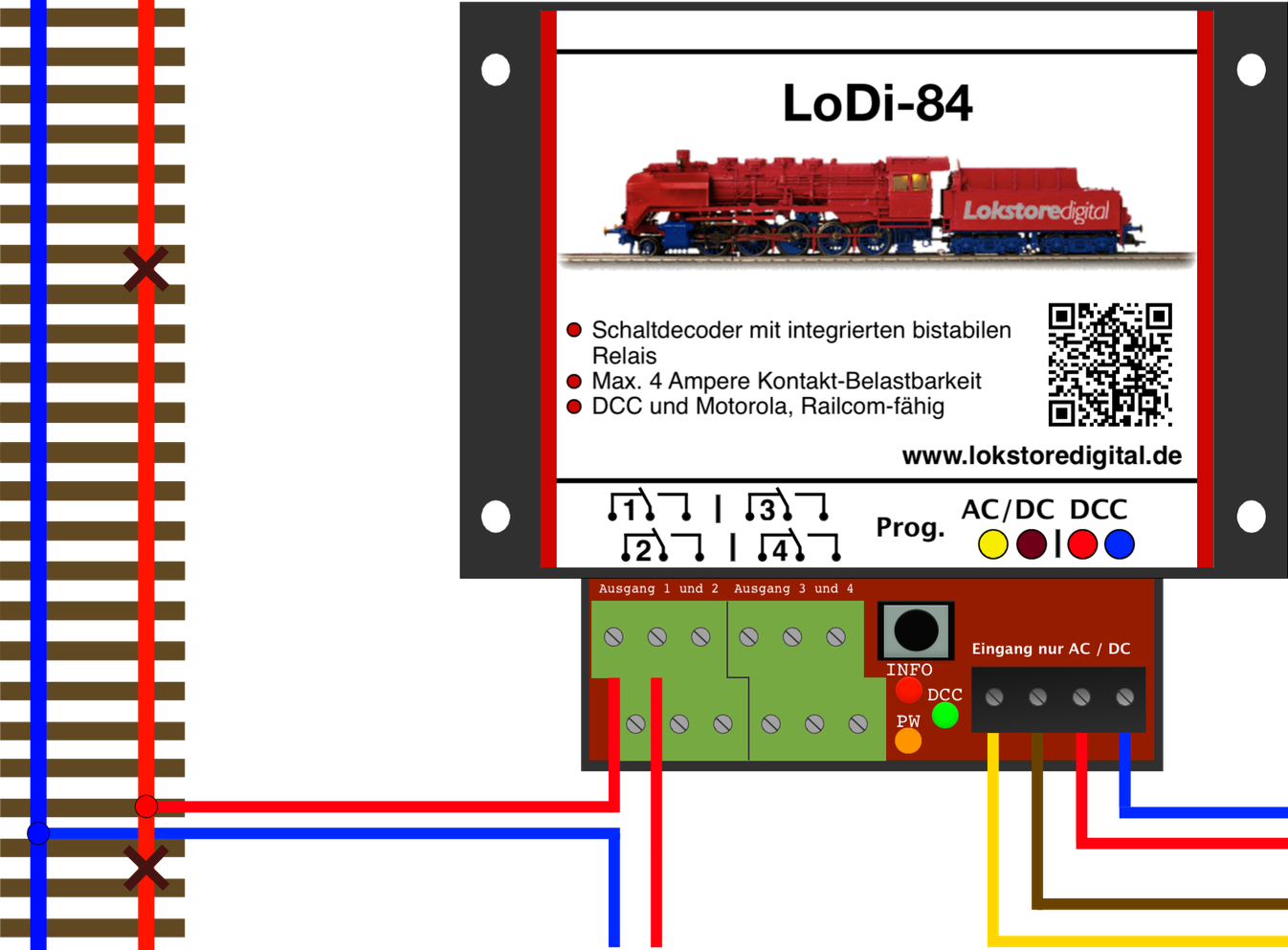
The decoder can of course also be used for interruptions on two-rail systems.
6. CV list, addressing and settings
The LoDi-84 is set through CVs.
If you have the LoDi-Rektor with a LoDi-Booster or CDE booster connected, you can write the CVs over PoM (programming on main) with the LoDi-ProgrammerFX.
The decoder can equally be programmed with any conventional command station that has a DCC programming output or handles PoM.
If you have a RailCom capable system, you can read the decoder's CVs live at any time.
Setting the DCC address: you have now installed the decoder successfully, the DCC cable is plugged in and the LoDi-84 glows orange continuously to show it is ready.
The green LED lights as soon as a signal is present at the DCC terminal.
As delivered, the decoder responds to turnout or accessory addresses 1–4.
If you want to change an address quickly, proceed as follows: there is a prog. button (2) on the decoder. Press it for 3 seconds.
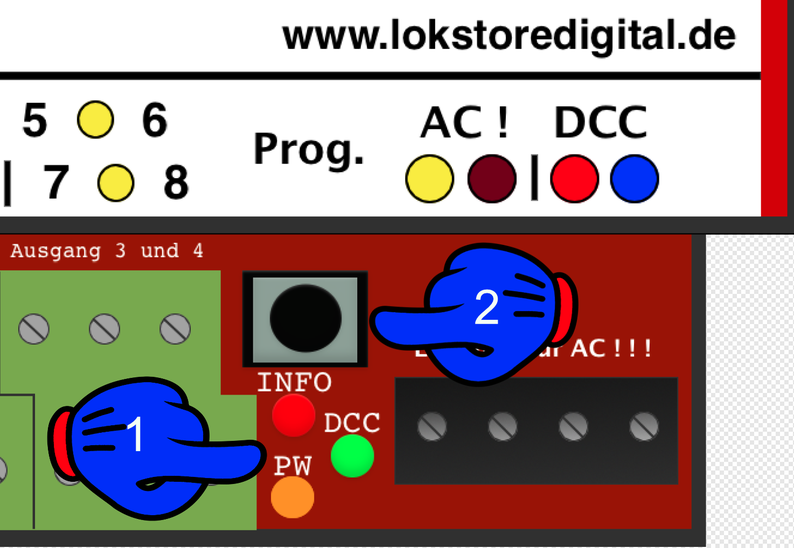
The info LED (red) (1) starts to flash quickly. That is the decoder telling you it is ready for a new address.
Now send the new address from the control software directly to a command station or the LoDi-ProgrammerFX (the LoDi-Rektor is required).
The decoder takes the address and the info LED changes from flashing to steady. It is now reachable at the address you chose. Only the first address has to be sent; the other three are assigned automatically. With 1, for instance, 1–4, and so on.
7. Technical data
| Property | Value |
|---|---|
| Dimensions | Length 8.9 cm |
| Width | 10 cm |
| Height | 3.5 cm |
| Weight | 96 grams |
At the digital terminal, that is in digital operation, the decoder can be supplied with up to 22 volts.
Do mind the specifications of your command station or booster manufacturer here.
Permissible from 7 to 24 volts DC, digital or AC.
Load per contact output of 4 amperes at a maximum of 60 volts.