
LoDi-Con manual
Firmware update

LoDi-OS is looked after continuously — especially in the first months we will be presenting updates and improvements regularly.
You will hear about every change and update in our forum; the updates for the device are made available to you automatically.
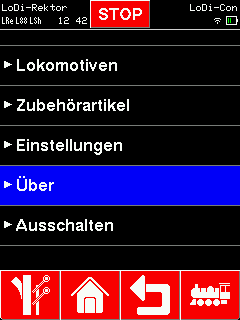
To install the update, first tap the "house".
From there go to "About".
This window holds further menu entries such as:
- "System information" (details of the version number and the memory in use)
- "Update firmware" (where the currently available firmware is offered)
- "Hardware test" (where the complete hardware of the handheld, and the battery or pack voltage, can be checked.)

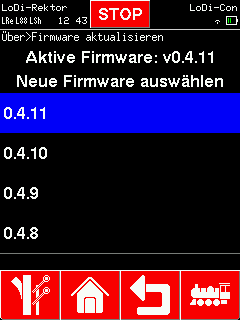
Once you are in the "Update firmware" menu, the current version is shown — in our case v0.4.1. Below it a new version 0.4.2 is waiting. Tapping it starts the update straight away.
After loading the new firmware the LoDi-Con restarts. The boot screen should now show the new firmware version.

Would you like to see the quality of the devices for yourself?
Get in touch with us HERE!
Visit our forum, where experienced users are happy to help you.