
LoDi-Con manual
Multiple traction
The LoDi-Con makes it easy to form multiple traction with up to 6 other locomotives.
Every locomotive function can be shown at the same time!
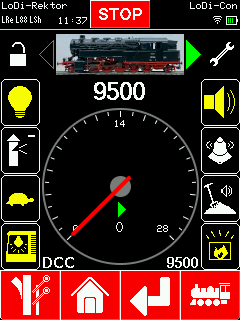
To form multiple traction, first select the lead locomotive. Then tap the "spanner" at the top right to reach the locomotive properties.
Swipe down until you reach "Multiple traction".

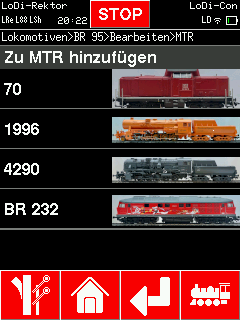
You are now in the menu where you can bring a locomotive from the database into the consist.
As soon as you have chosen the other locomotive, it appears in the multiple traction overview.
This menu lets you adjust the direction of travel of every locomotive in the consist.

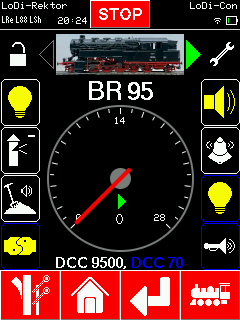
When you switch back to the locomotive overview, another DCC address appears in the bar at the bottom in a different colour. That is the second locomotive in the consist. The locomotive functions of the attached locomotive are shown with a blue outline as well.
You therefore have immediate access to every function in the consist.
Further locomotives added are given further colours. To reach every function, swipe down.

Would you like to see the quality of the devices for yourself?
Get in touch with us HERE!
Visit our forum, where experienced users are happy to help you.